


Handcent Next SMS messenger
4.425.73K Reviews
App Specs
- Version
- Varies with Device
- Updated On
- License
- Free
- Downloads
- 1,000,000+
- Developer
- Handcent
- Categories
- Communication
- Platform
- Android
Screenshots
 Analysis by AppCompare
I judge a texting app less by how many settings it can display than by whether it makes everyday conversations easier. Handcent Next SMS has a clear appeal for anyone who wants more control than a phone’s built-in SMS app usually offers. Its focus is still familiar texting, but it adds room to adjust the look, manage conversations, and use extras such as stickers and a private area. That flexibility can be useful, though it also means the first visit to the settings may feel like a project rather than a quick switch.
Who benefits most from a more hands-on messenger
I’d consider Handcent Next SMS if you send ordinary text and picture messages often and like tailoring the tools you use. It makes the most sense for someone who wants a distinctive inbox, separate notification choices for important contacts, or a few practical extras in the same app. If you rarely text, prefer a minimal screen, or already rely on a chat service where friends are active, a simpler default messenger may suit you better.
A useful way to approach it is to choose one annoyance you want to fix first. Maybe message previews are too easy to miss, or the default appearance is hard to scan. Change only the relevant setting, then use the app for a few days before exploring more. That keeps customization from becoming busywork and makes it easier to tell whether the change actually helps.
How it fits into the messaging landscape
Compared with the usual built-in SMS option, Handcent is the more adjustable choice: it offers more ways to shape the conversation view and notifications, while a default app is often easier to learn because it has fewer decisions. Compared with internet-based chat apps, the important distinction is the kind of conversation involved. Handcent is aimed at SMS and MMS, not a replacement for every service your friends may use. I would choose based on where the people I need to reach already communicate, rather than expecting one messenger to cover every kind of chat.
That distinction matters when you travel, switch phones, or message someone who does not use the same chat platform as you. Before making it your main inbox, check that it handles the messages you depend on in the way you expect, and keep your existing routine in mind. For a person who mainly wants a more personal SMS interface, its extra controls are the point; for someone seeking one universal chat network, a platform built around internet messaging may be a better fit.
A practical way to try the extras
There is a trade-off to feature-rich messaging: each extra can solve a specific problem, but every additional setting asks for attention. I would begin with appearance and contact-specific alerts, then decide whether the private area or other tools fit my habits. If you have a sensitive conversation in mind, test how the private feature behaves before relying on it for anything important. A lock or hidden view can help with casual privacy on a shared screen, but it should not automatically be treated as a guarantee of secure communication.
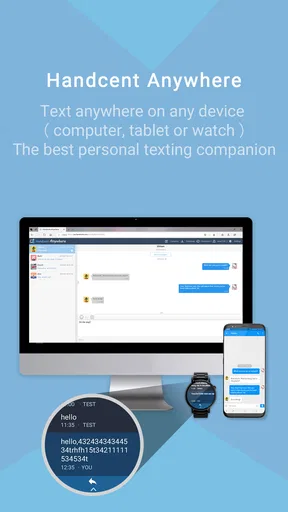
Likewise, a computer-based texting option can be handy when you are already working at a desk, but it is worth thinking about whether you want messages visible on another device. Set up only the access you will use, and be deliberate about who can reach that computer. This is a small workflow choice, not merely a convenience toggle: the easier it is to answer from a larger screen, the more important it is to consider the environment around that screen.
Worth Reading Before You Choose

EA SPORTS FC Mobile 26 Is a Bigger Football Game, but It Takes Time

Flipboard Shows What News Apps Must Do Beyond the Feed

Switching to Android Auto Means Rethinking Your Driving Routine

Google Calendar Makes a Crowded Week Easier to Manage

Ludo King Makes the Most of the Minutes Between Plans

Baby Panda World Brings Quick Play to Modern Phones, but Its Game Library Feels Busy
Everyday use and a few sensible checks
Picture a busy weekday: I’m at my desk, a family group is arranging a pickup, and a relative sends a photo by MMS. A configurable alert can help me notice that conversation without making every message equally disruptive, while a larger screen may make a quick reply less fiddly. Later, I can return to the same thread on my phone. The value is not that texting becomes new; it is that small choices can make a familiar routine fit the day better.
Before committing, I would also check the basics that matter to my own phone: whether the app can be selected as the default SMS handler, whether notifications arrive as expected, and whether contact names and existing conversations appear correctly. Those checks help separate an app problem from a setup issue. If something seems missing, confirm the relevant permissions and settings on the device rather than assuming that a feature will work identically on every phone.
What to expect from the product today
Handcent is a communication app from Handcent, and its stated release date is June 24, 2015. It remains a free download for users with Android 6.0 or later, with optional in-app purchases ranging from about 49 cents to about 45 dollars per item. The age rating is Everyone. Its average rating is 4.5 from around 75,000 ratings, with about 25,000 written reviews and over one million installs. Those figures suggest a well-established audience, but popularity cannot tell you whether its interface or extras will suit your own habits.
There is also a difference between knowing the release date and knowing the pace of current development. I would not read the original release date as proof that the app has stayed unchanged, nor assume that every feature works the same way on every device. Before paying for an optional item, check what it unlocks in the app and whether it addresses a need you already have. The free starting point makes it easier to judge the everyday experience first.
Where I would draw the line
My main reservation is that customization can make an app feel less immediate. A new user may spend time tuning colors, alerts, and message views before discovering which options matter. I’d resist trying to configure everything in one sitting. Keep the default setup until a real irritation appears, then adjust one thing; that approach is more likely to leave you with a useful layout instead of a collection of settings you forget.
I would also be cautious about treating any single SMS app as a complete privacy solution. A private box can be helpful for keeping a conversation out of casual view, but privacy depends on the broader device and the way you use it. Similarly, convenience features should be tested with your actual contacts and message types. If reliable access across multiple platforms, a lean interface, or a particular chat network matters more than SMS customization, choose an option designed around that priority.
First Impressions and Setup
Right off the bat, downloading Handcent Next SMS was a breeze. Available for both Android and iOS, installation was quick. As soon as I opened the app, I was greeted with a sleek and intuitive interface. It didn't take long to import my contacts and sync my messages. The app offers a quick setup guide to help you navigate its features, which is super handy if you're not tech-savvy.
Customization Galore
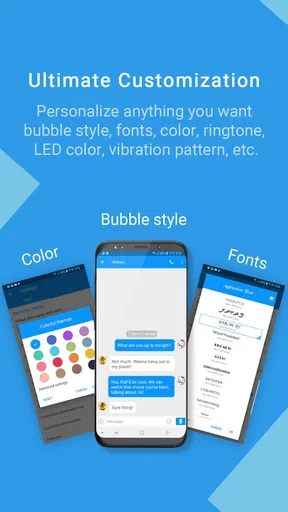
One of the biggest selling points of Handcent is its customization options. You can change everything from the background color to the font style and size. Fancy a chat bubble theme that matches your mood? They've got you covered. You can even customize notifications for different contacts, so you know who’s texting without even looking at your phone. I spent a good hour just playing around with the settings, which was both fun and a bit overwhelming.
Features That Stand Out
Handcent Next SMS isn’t just about looks. It’s packed with features that genuinely improve your messaging experience. Here are a few that stood out:
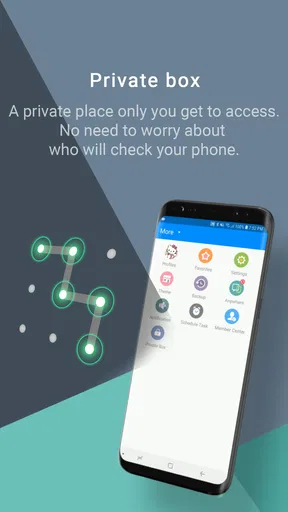
- Private Box: Keep your sensitive conversations hidden and secure. You can password-protect this feature, giving you peace of mind.
- Texting from PC: This is a game changer. You can send and receive texts from your computer, which is perfect for those of us who are desk-bound all day.
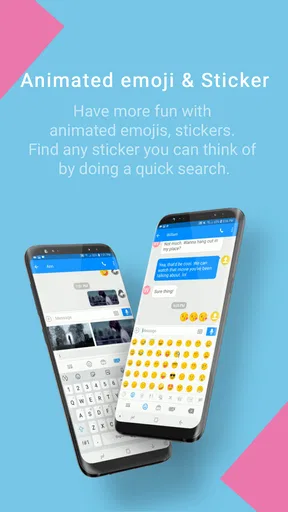
- Emoji and Sticker Support: With tons of emojis and stickers, expressing yourself has never been easier or more fun.
- Scheduled Messages: Need to send a birthday text at midnight but don’t want to stay up? Schedule it, and let Handcent do the magic.
- Group Messaging: It’s easy to manage group chats with its intuitive interface, and you can even create groups for different circles of friends.
Performance and Reliability
Performance-wise, Handcent Next SMS runs smoothly. I didn't experience any lag or crashes during my testing. Messages sent and received promptly, and the app handled multimedia messages without a hitch. Reliability is crucial for a messaging app, and Handcent seems to deliver on this front.
Security and Privacy
In today’s digital age, security is a top priority. Handcent offers end-to-end encryption for your messages, ensuring that your conversations remain private. Plus, the Private Box feature adds an extra layer of security for your most sensitive chats. It's nice to know that the app takes your privacy seriously.
Pricing Model
Handcent offers a free version with ads, which are not too intrusive. However, if you want to enjoy an ad-free experience and unlock additional features, there’s a premium subscription available. It's reasonably priced, and they offer a yearly plan that gives you the best value for money.
Final Thoughts
So, is Handcent Next SMS worth the download? If you're looking for a feature-rich messaging app that offers extensive customization options, then absolutely. It's ideal for users who want more control over their messaging experience without sacrificing security. While the sheer number of features might feel overwhelming at first, the intuitive design makes it easy to get the hang of things.
In conclusion, Handcent Next SMS brings a lot to the table. Whether you're tired of your default messaging app or just want to try something new, give it a shot. You might just find it's the upgrade you didn't know you needed.
How I’d make the decision
My recommendation comes down to a simple question: do you want your SMS inbox to feel personal and configurable, or do you want the least possible setup? Handcent is more compelling in the first case. If you enjoy shaping how conversations look and deciding which contacts deserve a distinct alert, its extra controls can earn their place. If you want an app that asks almost nothing of you, the phone’s standard messenger may be the more comfortable choice.
I’d also separate the free trial decision from the purchase decision. Start with the basic texting routine you already depend on, see whether messages and group conversations behave as you need, and only then consider optional purchases. That keeps the decision grounded in daily use rather than the appeal of a long feature list.
What I would watch for over time
For existing users, the most useful sign of product evolution is not simply a new setting; it is whether the core job stays dependable as phones and messaging habits change. I would pay attention to compatibility on the device you actually use, the clarity of any changes to the interface, and whether the extras remain easy to find without getting in the way of ordinary SMS. Those are practical checkpoints, not predictions about a particular update.
Handcent’s long-running presence and sizeable audience make it a credible option to try, but they do not remove the need to check fit. My overall view is that it suits people who want SMS to be more adjustable and are willing to spend a little time setting it up. It is less persuasive for anyone whose priority is a minimalist inbox or a single internet-based service shared by all their contacts. Try the core workflow first; if the added control improves your routine rather than complicating it, that is the clearest reason to keep it.
Pros
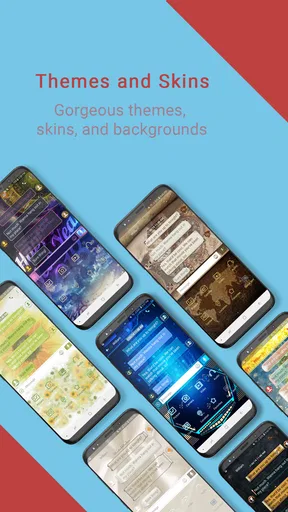
- Customizable themes enhance user experience.
- Supports multiple languages for inclusivity.
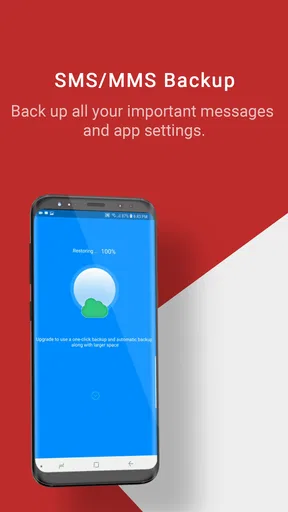
- Backup feature ensures message safety.
- Pop-up notifications for quick replies.
- Dual SIM support for convenience.
Cons
- Ads can interrupt messaging experience.
- Occasional syncing issues with contacts.
- User interface can feel cluttered.
- Limited free features without subscription.
- Requires frequent updates for stability.
FAQs for Handcent Next SMS messenger
What features make Handcent Next SMS stand out from other messaging apps?
Handcent Next SMS offers a variety of features that make it a standout choice for users. These include a highly customizable interface, support for SMS and MMS, group messaging, and a private box for secure chats. Integration with cloud services for message backup ensures you never lose important conversations.
Is Handcent Next SMS secure for private conversations?
Yes, Handcent Next SMS prioritizes user privacy with its Private Box feature, which allows you to keep sensitive conversations secure. You can set up a password or pattern lock for added security, ensuring that your private messages remain confidential and inaccessible to unauthorized users.
Can I customize the appearance of Handcent Next SMS?
Absolutely! Handcent Next SMS is known for its extensive customization options. You can personalize themes, fonts, and colors to suit your style. The app also offers custom notification sounds and ringtones, allowing you to tailor the messaging experience to your preferences.
Does Handcent Next SMS support multimedia messages?
Yes, Handcent Next SMS fully supports MMS, allowing you to send and receive multimedia messages. You can share photos, videos, and voice messages seamlessly, making it easy to enhance your conversations with visual and audio content.
How does Handcent Next SMS handle message backup and restore?
Handcent Next SMS offers robust backup and restore options through its integration with cloud services. You can easily back up your messages to Google Drive or local storage, ensuring that your conversations are safe. Restoring messages is straightforward, making device transitions smooth and worry-free.


